Author: CADinfo

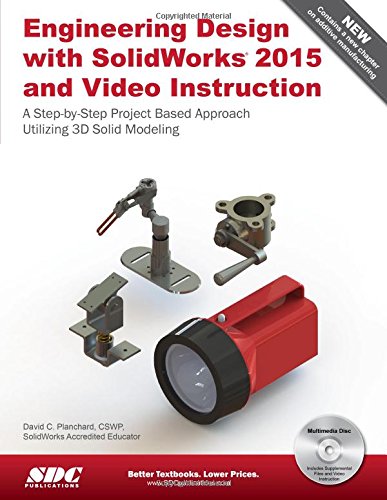
Engineering Design with SolidWorks 2015 and Video Instruction

Engineering Design with SolidWorks 2015 and video instruction is written to assist students, designers, engineers and professionals. The book provides a solid foundation in SolidWorks by utilizing projects with step-by-step instructions for the beginner to intermediate SolidWorks user. Explore the user interface, CommandManager, menus, toolbars and modeling techniques to create parts, assemblies and drawings in an engineering environment.

Follow the step-by-step instructions and develop multiple parts and assemblies that combine machined, plastic and sheet metal components. Formulate the skills to create, modify and edit sketches and solid features.

Learn the techniques to reuse features, parts and assemblies through symmetry, patterns, copied components, Design Tables, Bills of Materials, Custom Properties and Configurations. Address various SolidWorks analysis tools and Intelligent Modeling techniques along with Additive Manufacturing (3D printing). Learn by doing not just by reading.

Desired outcomes and usage competencies are listed for each project. Know your objective up front. Follow the steps in Projects 1 – 9 to achieve the design goals.

Review Project 10 on Additive Manufacturing (3D printing) and its benefits and features. Understand the terms and technology used in low cost 3D printers.

Work between multiple documents, features, commands and custom properties that represent how engineers and designers utilize SolidWorks in industry.

Review individual features, commands and tools with the Video Instruction. The projects contain exercises. The exercises analyze and examine usage competencies. Collaborate with leading industry suppliers such as SMC Corporation of America, Boston Gear and 80/20 Inc.

Collaborative information translates into numerous formats such as paper drawings, electronic files, rendered images and animations. On-line intelligent catalogs guide designers to the product that meets both their geometric requirements and performance functionality.

The author developed the industry scenarios by combining his own industry experience with the knowledge of engineers, department managers, vendors and manufacturers. These professionals are directly involved with SolidWorks every day. Their responsibilities go far beyond the creation of just a 3D model.

The book is designed to compliment the SolidWorks Tutorials contained in SolidWorks 2015.

View the provided videos in the book to enhance the user experience.

  • SolidWorks Interface
  • 2D Sketching, Sketch Planes and Sketch tools
  • 3D Features and Design Intent
  • Creating an Assembly
  • Fundamentals in Drawings Part 1 & Part 2

Table of Contents

Introduction
1. Overview of SolidWorks and the User Interface
2. Fundamentals of Part Modeling
3. Fundamentals of Assembly Modeling
4. Fundamentals of Drawing
5. Extrude and Revolve Features
6. Swept, Lofted and Additional Features
7. Top Down Assembly Modeling and Sheet Metal Parts
8. SolidWorks Simulation
9. Intelligent Modeling Techniques
10. Additive Manufacturing – 3D Printing
Appendix
Glossary
Index

Read More

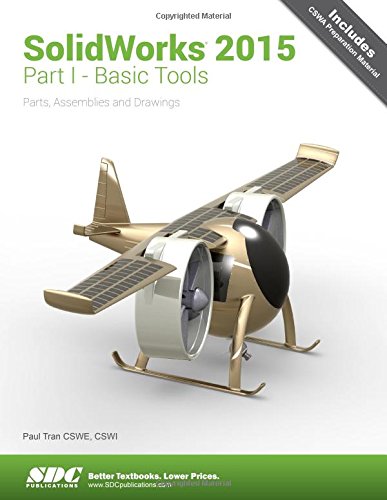
Solidworks 2015 Part I Basic Tools

SolidWorks 2015 Part I – Basic Tools introduces new users to the SolidWorks interface, SolidWorks tools and basic modeling techniques. It provides readers with a strong understanding of SolidWorks and covers the creation of parts, assemblies and drawings. Every lesson and exercise in this book was created based on real world projects. Each of these projects have been broken down and developed into easy and comprehensible steps for the reader. Furthermore, at the end of every chapter there are self test questionnaires to ensure that the reader has gained sufficient knowledge from each section before moving on to more advanced lessons. This book takes the approach that in order to understand SolidWorks, inside and out, the reader should create everything from the beginning and take it step by step.

Table of Contents

Introduction: SolidWorks 2015 User Interface
Setting the System Parameters
1. System Options
2. Document Templates
Basic Modeling Topics
3. Basic Solid Modeling – Extrude Options
4. Basic Solid Modeling – Extrude & Revolve
5. Revolved Parts – Ball Joint Arm
Derived Sketches – Center Ball Joint
6. Rib & Shell Features – Formed Tray
Using Shell and Mirror
Using the Intersect Feature
7. Linear Patterns – Test Tray
Circular Patterns – Spur Gear
Circular Patterns – Circular Base Mount
Curve Driven Patterns & Hole Wizard
8. Part Configuration – Machined Block
Contour Selection
9. Modeling Threads – Threaded Insert
Working with MultiBody Parts
10. Bottom Up Assembly – Ball Joint Assembly
Bottom Up Assembly – Links Assembly
11. Using Advanced Mates
Limit and Cam Mates
Radial Explode
Using Smart Mates
12. Layout Assembly
SolidWorks Animator – The Basics
Working with Sketch Pictures
13. Working with Sketch Pictures
PhotoView360 Basics
Drawing Topics
14. Drawing Preparations
15. Assembly Drawings – Links Assembly
Assembly Drawing – Alternate Position View
16. Drawing Views – Machined Block
17. Detailing – Machined Block Details
18. Sheet Metal Drawings – Post Cap
2D to 3D – Convert AutoCAD into SolidWorks
e-Drawings – Soft Lock Assembly
19. Configurations Part I – Button Assembly
Configurations Part II – Assembly & Drawing
20. Design Tables
Assembly – Design Tables
Level 2 Final Exams
21. Using the Intersect Feature
CSWA Core Preparation Practice
Glossary
Index
SolidWorks 2015 Quick-Guides

Read More

SolidWorks 2015 for Designers

SOLIDWORKS 2015 for Designers book is written to help the readers effectively use the modeling and assembly tools by utilizing the parametric and feature based approach of SOLIDWORKS 2015. This book provides detailed description of the tools that are commonly used in modeling, assembly, and sheet metal as well as in surfacing. The SOLIDWORKS 2015 for Designers book further elaborates on the procedure of generating the drawings of a model or assembly, which are used for documentation of a model or assembly.

Special emphasis has been laid on the introduction of concepts, which have been explained using text, along with graphical examples. The examples and tutorials used in this book ensure that the users can relate the information provided in this textbook with the practical industry designs.

Salient Features:

  • Consists of 20 chapters that are organized in a pedagogical sequence.
  • The author has followed the tutorial approach to explain various concepts of SOLIDWORKS 2015.
  • Detailed explanation of SOLIDWORKS 2015 tools.
  • The first page of every chapter summarizes the topics that are covered in it.
  • Consists of hundreds of illustrations and a comprehensive coverage of SOLIDWORKS 2015 concepts and techniques.
  • Step-by-step instructions that guide the users through the learning process.
  • Emphasis on Why and How with explanation.
  • More than 9 real-world mechanical engineering designs as tutorials and projects.
  • Additional information is provided throughout the book in the form of notes and tips.
  • Self-Evaluation Tests and Review Questions are given at the end of each chapter so that the users can assess their knowledge.
  • Technical support by contacting techsupport at cadcim.com.
  • Additional learning resources at allaboutcadcam.blogspot.com.
  • Read More